The IGNOU Assignment Result is an important part of the academic record for students enrolled in Indira Gandhi National Open University. Assignments are an essential component of the IGNOU evaluation process, and students need to submit their assignments within the prescribed deadline to receive the applicable marks or grades.
After assignments are submitted and evaluated by the concerned Study Centre or Regional Centre, the marks or grades are transmitted to the university system. Students can check the status of their assignment marks online through the official IGNOU assignment status portal.
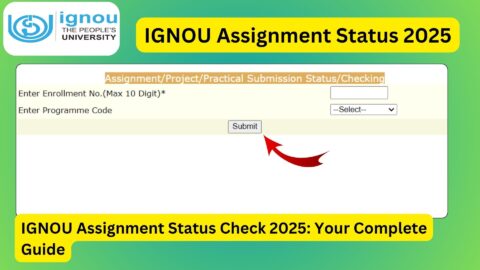
The portal asks students to enter their enrolment number and programme code. The official page also states that the assignment status is reflected only after marks or grades have been transmitted by the Study Centres or Regional Centres following the evaluation process.
IGNOU Assignment Result 2026
IGNOU assignments contribute to the overall academic evaluation of students. After submitting an assignment, the work is evaluated by the concerned Study Centre or Regional Centre. Once the evaluation process is completed, the marks or grades can be transmitted to the university system.
Students can then use the official IGNOU assignment status portal to check whether their assignment marks or grades have been updated.
It is important to understand that submitting an assignment and seeing its marks online are two different stages. A student may have successfully submitted an assignment but may not immediately see the marks online because evaluation and transmission of marks can take additional time.
Therefore, students should not become concerned if their assignment status is not updated immediately after submission.
Important IGNOU Assignment Result Information
| Information | Details |
|---|---|
| University | Indira Gandhi National Open University |
| Result/Status | IGNOU Assignment Result and Status |
| Evaluation | Assignment Evaluation |
| Status Mode | Online |
| Required Information | Enrolment Number and Programme Code |
| Official Assignment Status | https://isms.ignou.ac.in/changeadmdata/StatusAssignment.asp |
| Status Updated By | Study Centres/Regional Centres |
| Marks/Grades | Updated after evaluation and transmission |
| Applicable Students | IGNOU students who submitted assignments |
| Checking Method | Online |
How to Check IGNOU Assignment Result?
Students can check their IGNOU assignment result or assignment marks status online by following a few simple steps.
Step 1: Visit the Official Assignment Status Website
Open the official IGNOU assignment status portal:
https://isms.ignou.ac.in/changeadmdata/StatusAssignment.asp
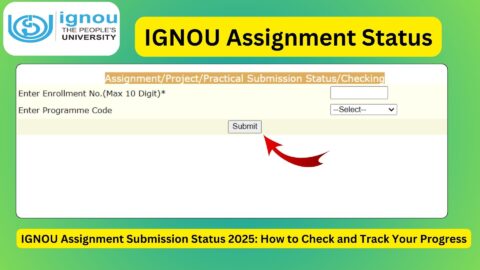
This is the page provided for checking the status of Assignment, Project, and Practical Awards/Marks Transmission.
Step 2: Enter Your Enrolment Number
On the assignment status page, enter your IGNOU enrolment number.
The official page specifies that students should enter their enrolment number, with a maximum of 10 digits.
Make sure you enter the correct enrolment number. An incorrect number may result in the system not displaying the expected information.
Step 3: Select Your Programme Code
The portal also provides an option to select the programme code.
Choose the programme that corresponds to your current IGNOU programme. Students should be careful when selecting the programme because the assignment status is associated with their academic programme.
Step 4: Submit the Details
After entering the required information and selecting the programme code, submit the details through the available option on the page.
The system will process the information and display the available assignment status.
Step 5: Check the Assignment Status
Once the information is displayed, carefully check the status of your assignment marks or grades.
If your assignment marks have already been transmitted to the university system, the relevant information may be displayed.
If the information is not available, it may mean that the evaluation or transmission process is still pending.
What Does IGNOU Assignment Result Mean?
The term IGNOU Assignment Result is commonly used by students to refer to the marks or grades received for their submitted assignments.
However, the official IGNOU page describes the service as Assignment/Project/Practical Awards/Marks Transmission Status. The page explains that the status will be reflected only when marks or grades have been transmitted by the concerned Study Centres or Regional Centres after the evaluation process.
This means that students should understand that the online status depends on the completion of the evaluation and marks transmission process.
Why Are IGNOU Assignment Marks Important?
IGNOU assignments are an important part of the academic evaluation process. Students are required to complete and submit assignments according to the instructions applicable to their programme and courses.
Assignments allow students to demonstrate their understanding of the subjects they are studying. They also form part of the academic evaluation associated with the respective courses.
Therefore, students should take assignment submission seriously and ensure that their assignments are completed correctly and submitted within the applicable deadline.
After submission, students should also keep proof of submission whenever available. This can be useful if they later need to address a discrepancy related to assignment submission or marks.
Why Is My IGNOU Assignment Result Not Showing?
One of the most common questions students have is why their assignment marks are not visible even though they have already submitted their assignments.
There can be several reasons for this.
The most important point is that the official assignment status page states that the status is reflected only when marks or grades have been transmitted by Study Centres or Regional Centres after the evaluation process.
Therefore, assignment marks may not appear immediately after submission.
The assignment generally needs to go through the relevant stages, including submission, evaluation, and transmission of marks or grades.
If any of these stages are still pending, the online status may not yet show the expected information.
Assignment Submitted but Marks Not Updated
If you have submitted your assignment but the marks are not showing online, you should first check whether sufficient time has passed for the assignment to be evaluated and the marks to be transmitted.
Students should also ensure that they submitted the assignment to the correct Study Centre or through the applicable submission method.
Keep the following information safely:
- Enrolment number
- Programme code
- Course code
- Assignment submission details
- Submission receipt, if available
- Date of submission
- Any acknowledgement received from the Study Centre
These details can be useful if you need to follow up regarding your assignment.
Does IGNOU Assignment Status Update Immediately?
No. Students should not expect assignment marks to appear immediately after submitting an assignment.
The official IGNOU assignment status page specifically states that the status is reflected after marks or grades have been transmitted by the Study Centres or Regional Centres following the evaluation process.
Therefore, there can be a gap between the date on which a student submits an assignment and the date on which the marks become visible online.
Students should regularly check the official portal instead of assuming that an assignment has not been evaluated simply because the marks are not visible yet.
IGNOU Assignment Result and Grade Card
Students should also understand the difference between the assignment status and the IGNOU grade card.
The assignment status portal is used to check whether assignment, project, or practical marks or grades have been transmitted.
The grade card is a broader academic record that may contain different components of a student’s academic performance.
Therefore, assignment marks may appear in the assignment status system before they are reflected in another academic record, or there may be a delay between different systems.
If you have recently received assignment marks, it can be useful to check the relevant academic record again after the university systems have been updated.
What If IGNOU Assignment Marks Are Incorrect?
If the assignment marks displayed online appear incorrect, students should first carefully verify the course code and programme information.
Students should also compare the available information with their assignment submission records.
If there appears to be a genuine discrepancy, the student should follow the appropriate IGNOU procedure for raising the issue.
Keep supporting documents such as assignment submission receipts and other relevant records because these may be useful when communicating with the concerned Study Centre, Regional Centre, or university authority.
What If the Assignment Status Shows No Information?
If the portal does not show assignment information, there are several things you can check.
First, make sure that the enrolment number has been entered correctly.
Second, verify that the correct programme code has been selected.
Third, remember that the official portal indicates that assignment status becomes visible after marks or grades are transmitted following evaluation.
If the evaluation or marks transmission process has not been completed, the assignment information may not yet be available online.
Students can check the portal again later.
Tips for Students Checking IGNOU Assignment Result
Students can follow a few simple practices to avoid confusion when checking their assignment marks.
Use the Official Portal
Always use the official IGNOU assignment status website when checking assignment marks or transmission status.
Official Assignment Result/Status:
https://isms.ignou.ac.in/changeadmdata/StatusAssignment.asp
Enter Details Carefully
Check your enrolment number before submitting the form. Also select the correct programme code.
Keep Submission Proof
Students should retain their assignment submission receipt or acknowledgement whenever available.
Check Course Codes
If marks are displayed, carefully compare the course codes with the assignments you submitted.
Check Again Later
If your assignment marks are not available, check the portal again after some time because evaluation and marks transmission may still be in progress.
Do Not Depend on Unofficial Information
Students should use official IGNOU systems for checking their academic records rather than relying solely on third-party websites or social media posts.
IGNOU Assignment Result for Different Programmes
IGNOU offers a wide range of undergraduate, postgraduate, diploma, certificate, and other programmes.
The assignment evaluation process can therefore involve a large number of students and courses.
Students from programmes such as undergraduate and postgraduate degrees, diplomas, certificates, and other IGNOU programmes may need to submit assignments according to the requirements of their respective courses.
The exact assignment requirements can vary by programme and course. Students should therefore follow the assignment instructions applicable to their own programme.
What Should Students Do After Assignment Marks Are Updated?
Once assignment marks are available, students should carefully check them.
You should verify:
- Your enrolment number
- Programme code
- Course codes
- Assignment marks or grades
- Any missing course
- Any unexpected information
If everything appears correct, keep a copy or record of the available information for future reference.
Students should also continue checking their broader academic record as other examination or evaluation components may be updated separately.
FAQ about IGNOU Assignment Result 2026
How can I check my IGNOU Assignment Result?
You can check your IGNOU assignment marks/status through the official assignment status portal:
https://isms.ignou.ac.in/changeadmdata/StatusAssignment.asp
Enter your enrolment number and select the appropriate programme code.
What is the official website to check IGNOU assignment marks?
The official portal for checking Assignment/Project/Practical Awards/Marks Transmission Status is:
https://isms.ignou.ac.in/changeadmdata/StatusAssignment.asp
What details are required to check IGNOU assignment status?
The official page asks students to enter their enrolment number and programme code.
Why are my IGNOU assignment marks not showing?
Your marks may not be visible because the assignment evaluation or marks transmission process has not yet been completed. IGNOU states that the status is reflected after marks or grades are transmitted by the Study Centres or Regional Centres following evaluation.
Can I check IGNOU assignment marks online?
Yes. Students can use the official IGNOU assignment status portal to check the available assignment marks or grades transmission status.
Does assignment submission mean that marks will appear immediately?
No. Submission, evaluation, and transmission of marks are separate stages. Assignment marks may take time to appear online.
What should I do if my assignment marks are missing?
First, verify your enrolment number and programme code. If the marks are still unavailable, wait for the evaluation and transmission process to be completed and check the official portal again. If the issue continues, follow the appropriate IGNOU procedure for assistance.
Is IGNOU Assignment Result the same as the Grade Card?
Not exactly. The assignment status portal provides information about assignment, project, and practical awards or marks transmission, while the grade card provides a broader academic record.
Can I check assignment status using my enrolment number?
Yes. The official assignment status page requires students to enter their enrolment number.
Should I keep my assignment submission receipt?
Yes. Students should keep their assignment submission receipt or acknowledgement safely. It can be useful if there is a discrepancy regarding assignment submission or marks.
Conclusion
The IGNOU Assignment Result is an important part of the academic evaluation process for students who have submitted their assignments. After assignments are evaluated, the concerned Study Centres or Regional Centres transmit the marks or grades to the university system.
Students can check the available assignment marks or transmission status through the official IGNOU portal:
https://isms.ignou.ac.in/changeadmdata/StatusAssignment.asp
To check the status, students need to enter their enrolment number and select the appropriate programme code. The official portal states that assignment, project, or practical marks and grades will be reflected after they have been transmitted by the concerned Study Centres or Regional Centres following the evaluation process.
If your assignment marks are not visible immediately after submission, there is no need to panic. The assignment needs to go through the evaluation and marks transmission process before the information can appear online.
Students should keep their assignment submission records, verify their enrolment number and programme code when checking the status, and regularly use the official IGNOU portal for updates.
By checking the official assignment status and carefully reviewing the available marks, students can keep track of an important component of their IGNOU academic record.